


During preparation of Percona-XtraDB template to run in RightScale environment, I noticed that IO performance on EBS volume in EC2 cloud is not quite perfect. So I have spent some time benchmarking volumes. Interesting part with EBS volumes is that you see it as device in your OS, so you can easily make software RAID from several volumes.
So I created 4 volumes ( I used m.large instance), and made:
RAID0 on 2 volumes as:
1 | mdadm -C /dev/md0 --chunk=256 -n 2 -l 0 /dev/sdj /dev/sdk |
RAID0 on 4 volumes as:
1 | mdadm -C /dev/md0 --chunk=256 -n 4 -l 0 /dev/sdj /dev/sdk /dev/sdl /dev/sdm |
RAID5 on 3 volumes as:
1 | mdadm -C /dev/md0 --chunk=256 -n 3 -l 5 /dev/sdj /dev/sdk /dev/sdl |
RAID10 on 4 volumes in two steps:
1 2 | mdadm -v --create /dev/md0 --chunk=256 --level=raid1 --raid-devices=2 /dev/sdj /dev/sdk mdadm -v --create /dev/md1 --chunk=256 --level=raid1 --raid-devices=2 /dev/sdm /dev/sdl |
and
1 | mdadm -v --create /dev/md2 --chunk=256 --level=raid0 --raid-devices=2 /dev/md0 /dev/md1 |
And also in Linux you can create tricky RAID10,f2 (you can read what is this here http://www.mythtv.org/wiki/RAID)
1 | mdadm -C /dev/md0 --chunk=256 -n 4 -l 10 -p f2 /dev/sdj /dev/sdk /dev/sdk /dev/sdm |
and also I tested IO on single volume.
I used xfs filesystem mounted with noatime,nobarrier options
and for benchmark I used sysbench fileio modes on 16GB file with next script:
1 2 3 4 5 6 7 8 9 10 11 12 13 14 15 16 17 18 | #!/bin/sh set -u set -x set -e for size in 256M 16G; do for mode in seqwr seqrd rndrd rndwr rndrw; do ./sysbench --test=fileio --file-num=1 --file-total-size=$size prepare for threads in 1 4 8 16; do echo PARAMS $size $mode $threads > sysbench-size-$size-mode-$mode-threads-$threads ./sysbench --test=fileio --file-total-size=$size --file-test-mode=$mode\ --max-time=60 --max-requests=10000000 --num-threads=$threads --init-rng=on \ --file-num=1 --file-extra-flags=direct --file-fsync-freq=0 run \ >> sysbench-size-$size-mode-$mode-threads-$threads 2>&1 done ./sysbench --test=fileio --file-total-size=$size cleanup done done |
So tested modes: seqrd (sequential read), seqwr (sequential write), rndrd (random read), rndwr (random write), rndrw (random read-write). And sysbench uses 16KB pagesize to emulate work of InnoDB with 16KB pagesize.
Raw results you may find in Google Docs https://spreadsheets.google.com/ccc?key=0AjsVX7AnrCYwdFlBVW9KWVJGUGFqeVdpUHY0Y0VXYXc&hl=en
, but let me show most interesting results from my point of view. On graphs I show requests / second (more is better) and response time in ms for 95% cases (less is better).
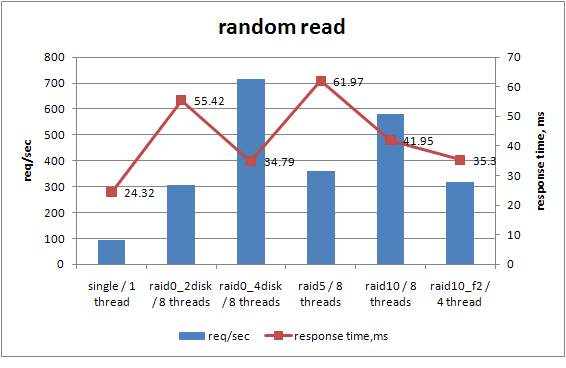

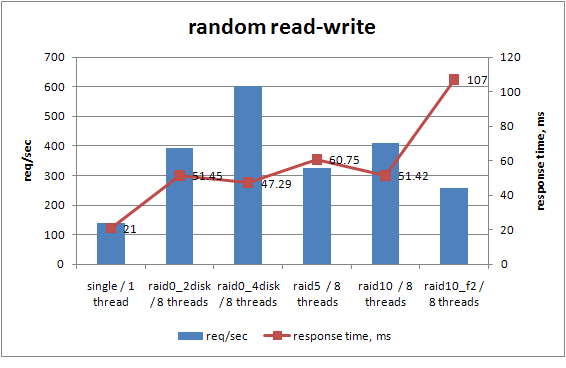
What I see from the results is that if you are looking for IO performance in EC2/EBS environment it’s definitely worth to consider some RAID setup.
RAID5 does not show benefits comparing with others, and RAID10,f2 is worse than RAID10.
But speaking RAID0 vs RAID10 it’s your call. For sure in regular server I’d never suggest RAID0 for database, but speaking about EBS I am not sure what guarantee Amazon gives here. I’d expect under EBS volume there already exists redundant array, and it may not worth to add additional redundancy, but I am not sure in that.
For now I’d consider RAID10 on 4 – 10 volumes.
And of course to get benefit from multi-threading IO in MySQL you need to use XtraDB or MySQL 5.4 ®
However there may be small problem with backup over EBS. On single EBS volume you can just do snapshot, but on several volumes it may be tricky. But in this case you may consider LVM snapshots or XtraBackup


@Vadim Tkachenko – I noticed the strangest thing when working with locally attached EC2 disks a year ago… If you fill up the disk completely, and then empty them IO is much faster!
The best explanation I had for this was that Amazon has a bitmap (in software) of what blocks you’ve seen, and they don’t want you to be able to recover the blocks from the previous person’s instance for the ones you haven’t. It kind of makes sense – but the problem was that the penalty was about x5 for a first write.
The distribution of some of your results looks pretty wide. Do you think the same could be true for EBS as well? It might be a good test to try over the weekend.
RAID5 on 3 volumes as:
mdadm -C /dev/md0 –chunk=256 -n 3 -l 0 /dev/sdj /dev/sdk /dev/sdl
“-l 0” means “level 0”, how come RAID5?
Jean-Emmanuel Orfèvre ,
Sorry, typo. fixed
@Morgan Tocker – the first write to a disk block on EC2 has a performance penalty. I have not read the explanation, but Amazon mentions it at http://docs.amazonwebservices.com/AWSEC2/latest/DeveloperGuide/index.html?instance-storage.html
Very nice and interesting results. Something that looks fishy to me is that with 1 volume you seem to be getting the best performance with a single thread, but with two striped volumes you get the best performance with 16 threads. If one volume “can’t handle” more than one thread effectively, you should see the best performance on 2 volumes with 2 threads or perhaps 4, but not with 16. So something is going here…
Amazon is pretty clear about the fact that each EBS volume has redundancy built in and that adding additional redundancy is not particularly recommended (at that point other failure modes dominate anyway). Instead, it is recommended to spend the extra effort on doing frequent snapshots (which have their own set of performance effects).
How many distinct instances did you fire up and run the tests, btw?
The issue we ran into trying to get performance out of EBS volumes with software RAID is that they are not all consistent over time. We were ending up with a slow volume, and which volume was slow might change over time. If you care about reads, then in theory a smart RAID1 setup with the right kernel could fix that by balancing reads based on performance, but if you just have a dumb round robin read setup then you are hamstrung by the slowest disk. If you care about writes, it is pretty tough no matter what you do.
http://aws.amazon.com/ec2/instance-types/ says:
“While some resources like CPU, memory and instance storage are dedicated to a particular instance, other resources like the network and the disk subsystem are shared among instances.”
While I have no experience with EC2, I assume this to cause quite a bit of unrealiable I/O behavior.
Were all your EBS volumes in the same availability zone?
@Dave Rose:
EBS volumes can only be accessed by instances in the same availability zone, so the answer to your question is “yes”, by necessity.
Has the recent outage on Amazon/EBS made you reconsider RAID0? Supposedly some volumes were complete lost. Others had reachability problems throughout the day. I assume using SW RAID1/10 could have saved some of these situations.
RAIDed EBS volumes can be snapshotted just as with non-RAIDed volumes. You simply have to either unmount the md volume or use XFS and freeze the volume briefly for the duration of the snapshot. ec2-consistent-snapshot from Alestic supports the XFS freeze/unfreeze methodology with a FLUSH TABLES WITH READ LOCK or MySQL shutdown.
@Vadim Tkachenko, we were considering a RAID setup on EC2 and I found this post. I wanted to confirm your findings before doing something like this in production. I created a new large instance and a RAID0 array of 4 EBS volumes (4GB each). I used the same configuration as you did. I also attached a single EBS volume for reference. I used XFS on both and I run the same benchmark as you did.
I was surprised to find *no performance improvement* whatsoever over the single EBS volume. All the results were almost the same except for rndwr with 8 threads for the 256Mb file (which showed a 1.6x improvement with raid0).
Do you have any idea why this might be? I’ve uploaded my results to CloudApp: http://cl.ly/0W3q3e3V432X2e3z3n1Y/sysbench_ebs_raid0_4.zip and http://cl.ly/3G2v280d2a2r3N3r3w1N/sysbench_ebs_single_drive.zip
Hi,
@Vadim Tkachenko, I believe things must have improved on AWS/EBS side so like Laszio posted, maybe there is not much performance difference any more with different RAID setups.Do you plan to repeat the test?
Also it would be interesting to compare these with RDS.
best wishes,
Oz
Now you have EBS with guaranteed iops, would be nice to see benchmark of them too.